How to Set Xhorse XKGHG1EN Garage Remote Frequency?
Xhorse XKGHG1EN Masker Garage Remote is special design that can manually switch over 20 frequencies available. The frequency edition can be set by VVDI key tool series device like VVDI Key Tool Max or Key Tool Max PRO. This article guides to set garage remote frequency for beginners.
How to set Xhorse garage remote frequency?
There are many different brands of carage remotes in market. Different manufactures maybe with different frequency. If the original remote and Xhorse carage remote frequency are different, it may cause remote cloning failed or even successful cloning but with too short working distance. Xhorse carage remote supports to set frequency function(20 frequency point) to ensure frequency is same as the original one.
- Enter set frequency mode:
Press and hold the "Lock"&"Pause" buttons

at same time, remote LED light is on. Keep pressing 2 buttons until the remote LED light is off, then release the buttons.
- Set frequency:
Press the "Up" button

once, LED will be flashing once. For different frequency should press with different times. Please check the following frequency reference table.
- Double check frequency:
After setting frequency successfully, release all buttons and wait 5s. The remote LED will flash, flashing times depends on the set frequency(please check frequency reference table).
- Exit set frequency mode:
After remote LED stop flashing, press the "Lock" and "Pause" buttons

immediately. Meanwhile, the LED light is on, keep pressing 2 buttons until LED light is off. Then release all buttons, set frequency operation is successful.
If the remote frequency is not in the frequency reference table, VVDI Key Tool series device(VVDI Key tool, VVDI Mini Key Tool, Key Tool Max or Key Tool Plus) support to set frequency at random point.
Eg. Use Key Tool Max cloning 320.5MHz original remote.
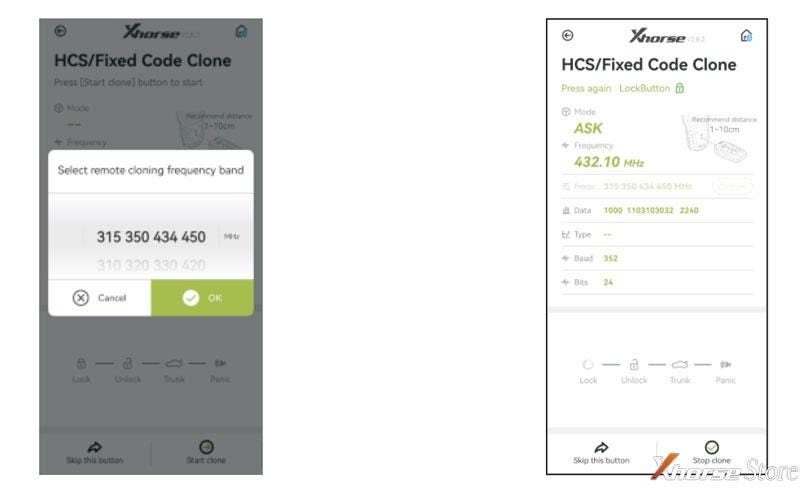
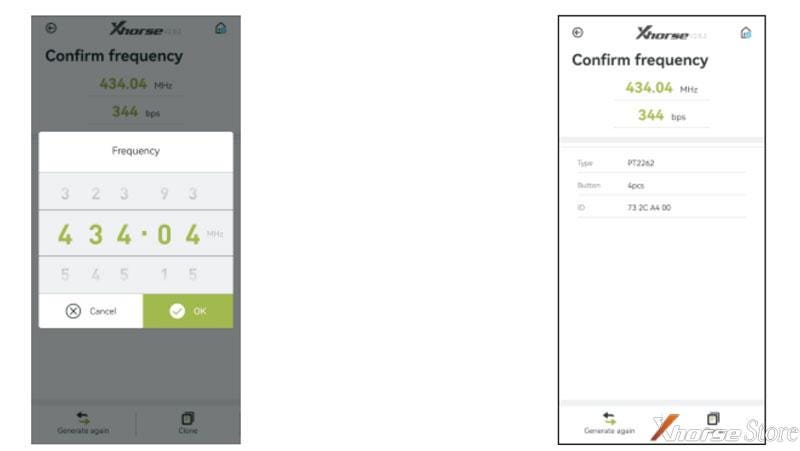
Take Key Tool Max as an example, copy 320.5Mhz carage remote, and the operation steps are as follows:
- Enter Key Tool Max HCS/Fixed Code Clone interface & select 320 frequency range;
- Press button of the original remote according to the device prompts;
- Edit the frequency that required;
- Cloning the data(If the original remote and cloning remote function code chasing occured, it can be solved by programming remote after the rolling code ID regeneration).
Xhorse Garage Key Frequency Reference Table
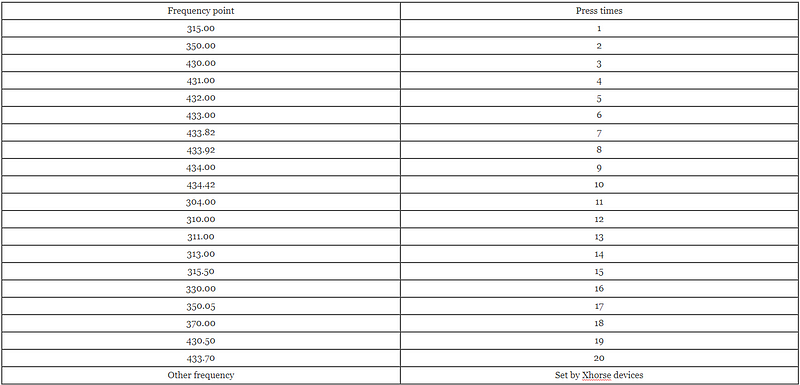
Remark:
Modify key frequency with Xhorse VVDI Key Tool Max Pro


Comments
Post a Comment